


AI Software Development: When Does Your Business Actually Need It?
A Goodfirms survey of over 100 global software companies found that 90.6% of development teams have now adopted AI tools somewhere in their build process, and 61% expect it to cut project budgets by 10 to 25 percent. That's a big shift from even two years ago, when "AI in software development" mostly meant a chatbot bolted onto a website. But here's the problem I keep running into with clients: the term has become nebulous — a word that basically means vague or hard to pin down and business owners end up either overspending on AI they don't need, or ignoring it entirely because it sounds like hype. Neither is a great outcome. This piece is about figuring out where you actually stand and honestly, that's the exact conversation a good custom software development company should be having with you before any contract gets signed.
What Is AI Software Development?
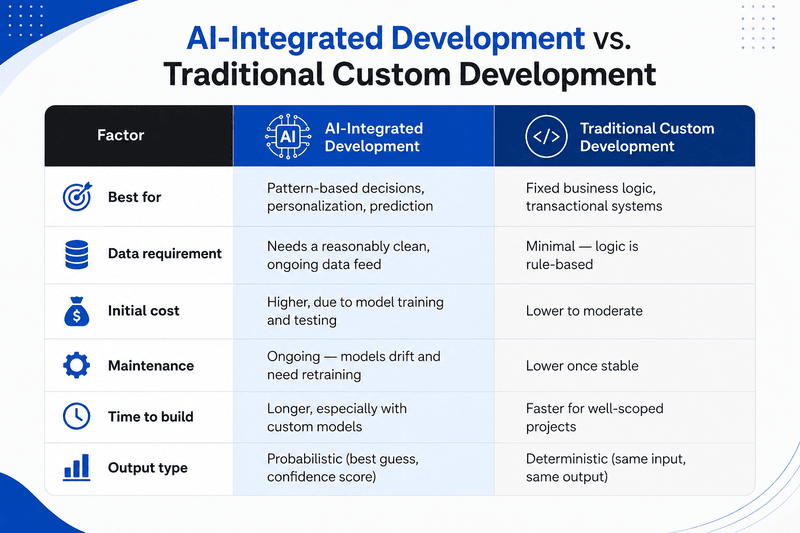
At its core, it's software built with AI woven into how it works, not just how it's coded. There's a difference between a developer using an AI assistant to write code faster, and a product that uses machine learning to make decisions for your users. Both count, but they solve different problems.
It generally includes:
- Predictive features (demand forecasting, churn prediction, fraud flags)
- Natural language interfaces — chatbots, voice assistants, document search
- Computer vision for image or video-based tasks
- Process automation that learns from patterns instead of following fixed rules
- AI-assisted development tooling used by your engineering team, even if the end product isn't "AI-powered" itself
Why Businesses Choose It
The honest answer is usually cost, speed, or a competitive gap they can't close manually. This is the most common reason clients approach a software development company in Ludhiana in the first place. Companies bring AI into custom builds when they want to:
- Cut manual review time on repetitive tasks like invoice processing or support tickets
- Personalize customer experience without hiring a bigger ops team
- Catch anomalies (fraud, defects, downtime risk) faster than a human reviewer would
- Stay competitive against rivals already automating parts of their workflow
- Extract insight from data they're already collecting but not using
Where AI Actually Earns Its Keep
Not every feature needs a model behind it. These are the areas where I've seen it genuinely pay off for small and mid-sized businesses working with a software company in Ludhiana Punjab or elsewhere.
- Customer support triage — routing and drafting responses, not replacing agents
- Inventory and demand forecasting for retail or manufacturing clients
- Document processing — extracting data from invoices, contracts, forms
- Recommendation engines for e-commerce or content platforms
- Quality control in production lines using image recognition
Mittal Technologies Insight: We usually tell clients to start with one narrow, measurable use case, like automating a single repetitive report — before touching anything customer-facing. It's less exciting, but it's how you find out if your data is even good enough to support bigger AI ambitions. If you want a second opinion on where to start, our developers and strategists have sat through this exact decision with dozens of businesses.
When You Genuinely Don't Need It
This is the section most agencies skip, and it's the one that builds trust. You probably don't need AI if your process is simple, your data volume is low, or the "problem" is really a workflow issue that better software design would fix on its own. A basic CRM integration or a cleaner database schema solves more business problems than people expect — no model required.
The Build Process, Realistically
- Define one business outcome you're trying to move, not a feature list.
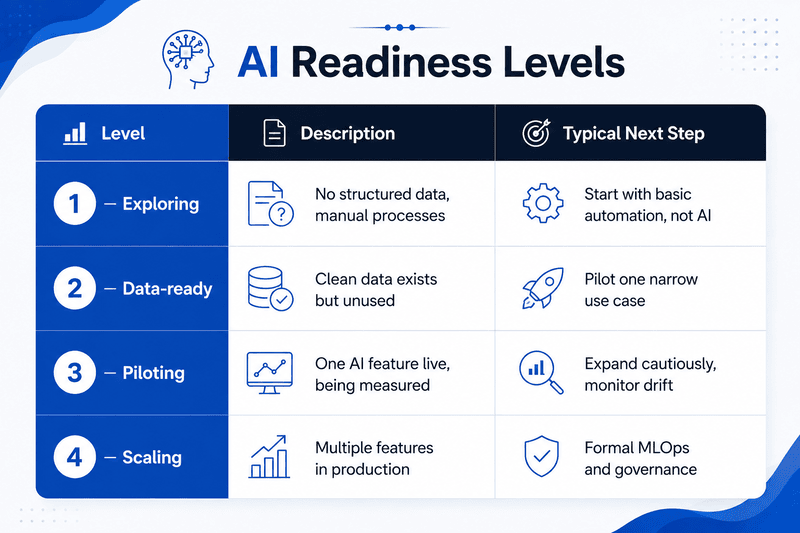
- Audit your existing data for volume, quality, and accessibility.
- Choose build vs. buy — many use cases are already solved by existing APIs.
- Prototype small, test against real data before full development.
- Integrate with existing systems rather than building in isolation.
- Set a retraining and monitoring schedule, since models degrade over time.
- Review outcomes against the original business metric, not just accuracy scores.
Common Challenges (And What Actually Fixes Them)
- Bad or sparse data — Best Practice: run a data audit before any model work starts, not after.
- Unrealistic expectations from leadership — Best Practice: set outcome-based KPIs early, tied to business metrics, not model accuracy.
- Model drift over time — Best Practice: schedule quarterly retraining and monitoring, budgeted in from day one.
- Vendor lock-in with proprietary AI platforms — Best Practice: work with a provider offering custom software development services built on portable, documented architecture.
- Underestimating ongoing cost — Best Practice: treat AI features as a recurring line item, not a one-time build.
Measuring Success
Business KPIs: revenue impact, cost per transaction reduced, customer retention change, time saved per process, support ticket deflection rate.
Technical KPIs: model accuracy and precision, latency, data drift frequency, uptime of AI-dependent features, retraining cadence.
What's Coming Next
- Smaller, task-specific models replacing bulky general-purpose ones for cost reasons
- More AI development happening inside existing SaaS tools rather than custom builds
- Regulatory pressure increasing around data use and model transparency
- Retrieval-based AI (grounding answers in your own documents) becoming standard, not niche
- Growing gap between companies using AI well and those just bolting it on
Where This Leaves You
AI software development isn't a yes-or-no decision for your whole business; it's a decision per problem. Some parts of your operation will benefit from it now; others won't for years, if ever, and pretending otherwise just burns the budget. If you're weighing where your business actually sits on that spectrum, book a 20-minute scoping call and we'll tell you plainly which parts are worth building now and which ones can wait — no pressure to sign anything after.
FAQs
1. Is AI software development only for large enterprises?
Not at all — and honestly, smaller businesses sometimes move faster here than big ones. When you're not weighed down by five layers of approval, you can pick one focused use case, test it, and see whether it actually pays off, instead of sinking months into a sprawling AI system before you know if it works.
2. How long does an AI feature typically take to build?
Depends a lot on what you're building. A simple integration — say, plugging in an existing AI service for document scanning — might take a few weeks. A custom-trained model built around your own data is a different story; that can run several months once you factor in testing, integration work, and how much customization the use case actually needs.
3. How much does AI software development cost?
There's no single number here, and anyone who gives you one without asking questions first is guessing. Cost tracks closely with complexity — a lightweight AI feature bolted onto existing software costs a fraction of what a fully custom AI platform or trained model will run you. Data requirements and integration work move that number more than people expect.
4. Do we need our own data science team?
Most businesses don't, at least not on day one. A solid AI software development company can plan, build, and maintain your first project or two without you having to hire an in-house team you may not need long-term. That said, if AI ends up central to your product, bringing that expertise in-house eventually is worth thinking about.
5. Can existing software be upgraded with AI, or does it need a rebuild?
Usually, no rebuild is required. Most systems can take on AI features through APIs, integrations, or new modules layered on top of what's already there. The exception is when the underlying architecture is genuinely outdated or brittle — in that case, a rebuild might be the more honest recommendation, even if it's not what people want to hear.