


Mobile App Development Company: A Practical Guide to Choosing the Right Partner
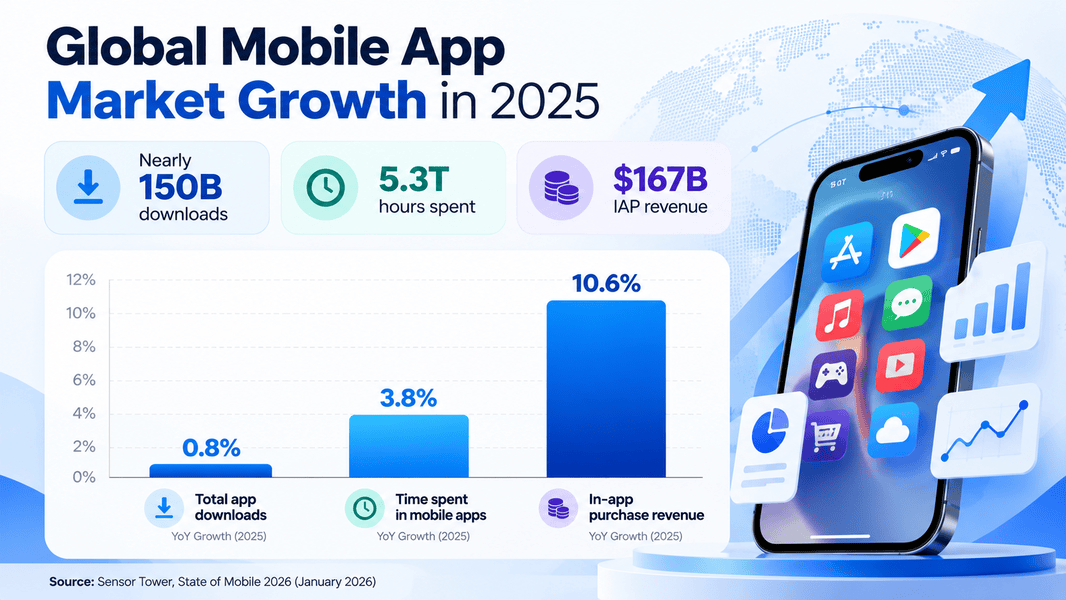
Every business wants an app now, but very few get one that people actually keep on their phones. At Mittal Technologies, we've watched this play out across projects, and the pattern rarely changes. The competition is intense: according to Sensor Tower’s State of Mobile 2026, global app downloads reached nearly 150 billion in 2025, while consumers spent 5.3 trillion hours using mobile apps across iOS and Google Play. With so many apps competing for users’ attention, simply launching an app is no longer enough. Choosing the right mobile app development company can widen or narrow that gap, and a lot of businesses make it based on a slick pitch deck and the lowest quote. This guide walks through what to check, what to question, and what to walk away from.
What Is a Mobile App Development Company?
It's a team that plans, designs, builds, tests, and maintains apps for iOS, Android, or both. The good ones act more like a product partner than a coding vendor. Typically that covers:
- Product strategy and scoping
- UI/UX design
- Native or cross-platform development
- Backend and API work
- Testing, store submission, and post-launch support
If a firm only talks about code and never asks about your users, treat that as an early warning.
Why Businesses Choose Professional Mobile App Development Services
Teams rarely hire out because they can't code. They hire out because the cost of a failed launch is higher than the cost of doing it properly. The outcomes they're usually after:
- A faster path from idea to a working release
- Fewer crashes and store rejections
- A design that matches how people actually use phones
- Security and data handling that hold up under scrutiny
- Reliable support when something breaks after launch
AI-Built App vs Custom-Built App
AI app builders have improved a lot, and they're genuinely useful for prototypes. Here's how they stack up against a custom build.
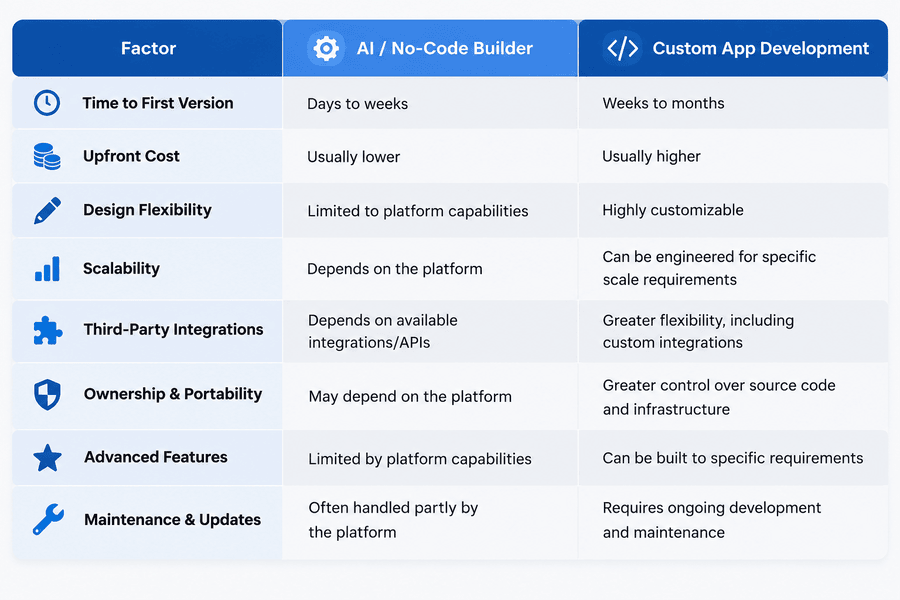
My view: use AI tools to test an idea, then build custom once the idea earns it.
Check the Proof Before the Pitch
Portfolios are easy to polish. What matters is whether the work is still live and still working. A reliable mobile app development company will happily show you apps in the stores, explain the trade-offs they made, and let you speak to a past client.
- Open their live apps on a real phone and see how they feel
- Ask what went wrong on a past project and how it was fixed
- Look for work in your industry, or at least a similar level of complexity
- Check store ratings and how the team responds to reviews
- Request a reference you can actually call
Mittal Technologies Insight: A team that can describe a project that went sideways is usually more trustworthy than one claiming a spotless record. Nobody ships a dozen apps without a few scars.
Match the Tech Stack to Your Goals
Native (Swift, Kotlin) gives you the smoothest performance and deepest device access. Cross-platform frameworks like Flutter and React Native save budget when you need both platforms at once. Neither is automatically right.
- Ask why they recommend a particular stack, not just what it is
- Confirm they can support the version of iOS and Android your users actually run
- Check how they handle offline behaviour and slow networks
- Ask who owns the source code and repository from day one
- Make sure third-party libraries are maintained, not abandoned
An honest answer sometimes sounds like "you don't need a native app yet." Take that seriously.
Look at Communication and Pricing Models
Fixed-price, time-and-materials, and dedicated-team models each suit different situations. Fixed price works when scope is clear. Anything exploratory fits time-and-materials better. If you're still comparing mobile app development services, ask each firm to break their estimate into discovery, design, development, testing, and support. Vague line items are where budgets get ambushed later.
- Ask who your day-to-day contact will be
- Agree on sprint reviews and demo schedules
- Clarify what counts as a change request
- Get the support terms in writing
- Watch how fast and clearly they reply before you've signed anything
Mittal Technologies Insight: Responsiveness during the sales stage is the best preview you'll get of responsiveness during the project. If replies take a week now, they won't speed up later.
A Practical Process for Choosing
- Write a one-page brief: users, core features, platforms, rough budget.
- Shortlist three to five companies based on relevant work.
- Hold discovery calls and note who asks sharper questions than you do.
- Request itemised proposals with timelines.
- Check two references per finalist.
- Run a small paid pilot or design sprint where possible.
- Sign a contract that covers code ownership, support, and exit terms.
Have an app idea but aren't sure where to start? Talk to our team about your scope, technology options, and development requirements before committing to a project.
Challenges and Best Practices
Scope creep. Features pile up and the deadline slides. Best Practice: lock a minimum viable scope, and put every addition through a written change request with cost and time attached.
Underestimated testing. Apps that run fine on one phone break on another. Best Practice: insist on testing across real devices and OS versions, not just emulators.
Weak security. Many first-time owners never ask about data storage or encryption. Best Practice: request a security checklist covering authentication, API protection, and compliance with rules like GDPR where relevant.
Vendor lock-in. Some agencies keep the code or the hosting hostage. Best Practice: own the repository, credentials, and developer accounts from the start.
No post-launch plan. Apps need updates every time Apple or Google changes something. Best Practice: budget for maintenance from the outset, since it's an ongoing cost and not a surprise.
Poor user research. Teams build what they like, not what users need. Best Practice: validate with real users before development and again before launch.
Where a Development Company Is Not the Answer
An agency won't fix an unclear idea. If you can't say who the app is for or why they'd open it twice, you'll pay to build uncertainty. A landing page, a mobile-friendly website, or a prototype might serve you better first. Outsourcing also costs real money, and a small internal tool might be cheaper to build with a freelancer or an AI-assisted workflow.
Tools Modern Teams Use
- Figma for design and prototyping
- GitHub Copilot for developer assistance (reviewed by humans)
- Firebase for backend services and analytics
- TestFlight and Google Play Console for beta distribution
- Crashlytics for live crash tracking
A tool list tells you very little by itself. Ask how the team uses them.
Where Mobile Development Is Heading
- On-device AI features that work without sending data to the cloud
- Wider use of cross-platform frameworks as performance gaps shrink
- Tighter privacy rules shaping how apps collect data
- Foldables and wearables pushing teams to design for more screen types
- Super-app thinking, where one app handles several everyday tasks
The Short Version
Choosing well comes down to proof, clarity, and honest communication. You can see how that plays out in practice through our work on Velaflow, one of several app development services projects where scope, design, and delivery had to line up. Start with a small conversation and see how a team thinks.
FAQs
1. How do I know if a mobile app development company is reliable?
Look for live apps in the stores, reachable references, clear contracts, and a team that asks about your users before quoting a price.
2. How long does it take to build an app?
It depends on complexity. A simple app can take a couple of months, while feature-heavy products with integrations take considerably longer. Discovery gives you a realistic estimate.
3. Should I choose native or cross-platform?
Choose native when performance and device features matter most. Choose cross-platform when you need both platforms on a tighter budget.
4. What should a proposal include?
Scope, timeline, itemised costs, tech stack, testing approach, support terms, and who owns the code.
5. Do I need to pay for maintenance after launch?
Yes. OS updates, bug fixes, and security patches are ongoing, so plan for them from the start.