


How to Connect Business Applications Through AI Automation
Most companies we speak with don’t have a software shortage. They have a software pile. According to MuleSoft's 2026 Connectivity Benchmark Report, organizations manage an average of 957 applications, but only 27% are connected. The problem becomes even more significant as businesses adopt AI, with 82% of IT leaders identifying data integration as a major challenge when using AI. Disconnected systems make it harder to share information, coordinate workflows, and get meaningful results from AI investments. AI Workflow Automation closes that gap by moving the data and deciding what should happen next. Here’s how it works, where it breaks, and how to plan it without wasting a quarter on a pilot.
What Does Connecting Business Applications With AI Mean?
Your CRM, accounting software, support desk and internal tools pass information to each other automatically, and an AI layer handles the judgment calls: reading an email, sorting a request, spotting a strange invoice. Old-style integration moves data from A to B. The AI part works out what that data means.
It usually includes:
- API integration and webhook connections between your apps
- Data clean-up, so “Acme Ltd” and “ACME Limited” stop being two customers
- AI steps such as classification, extraction and summarising
- Human approval points for anything risky
- Logging, so you can see what happened and when
Why Businesses Choose AI Workflow Automation
Nobody buys this for the technology. Something hurts, so they buy.
- Fewer copy-paste errors in customer and finance records
- Faster responses, since requests get routed the moment they arrive
- Staff time moved from data entry to work that needs a person
- One consistent version of each customer across tools
- A cleaner audit trail than a shared inbox
A good AI automation company will push you to pick one painful process first. Be wary of anyone who wants everything automated in month one.
Business Automation Services: How the Options Compare
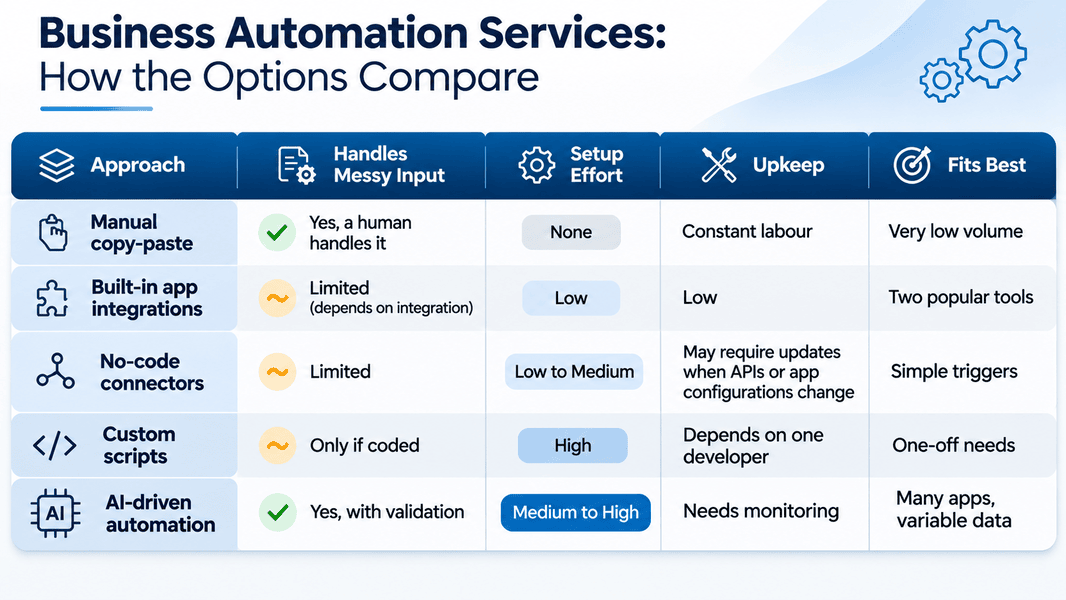
Most business automation services quietly stop at row three. That works until your data stops being tidy, which in my experience happens around month four.
Sales and CRM: Stop Retyping Leads
A lead arrives and should reach the right salesperson within minutes. In most firms it doesn’t.
- Form submissions create CRM contacts and check for duplicates
- AI scores the enquiry from the message text
- Hot leads trigger a task and a chat alert
- Closed deals pass to invoicing without re-entry
Mittal Technologies Insight: Start with lead routing. It has a clear before and after, and the sales team feels the difference within a week.
Finance and Operations: Invoices Without the Inbox
Invoices arrive as PDFs, photos and email bodies, which is exactly where plain integration falls over.
- AI extracts supplier, amount and due date
- Entries are matched against purchase orders in the accounting tool
- Mismatches go to a person, not into the ledger
- Approved items post automatically and update the payment calendar
Customer-Facing Search and Support
This is where we have the clearest example. We built PropMangal, a verified property platform for Punjab, with an Ask AI search running on OpenAI next to listings, broker profiles and area data. The PropMangal case study shows how those pieces sit together: 2,000+ listings and 100+ verified professionals behind one search box.
- Natural-language search over structured listing data
- Answers drawn from the same records brokers keep updated
- Hand-off to a human for specific questions
- Area insights fed by the same database
Mittal Technologies Insight: Let the AI read from your live records, not a copy. Copies go stale, and nobody notices until a customer does.
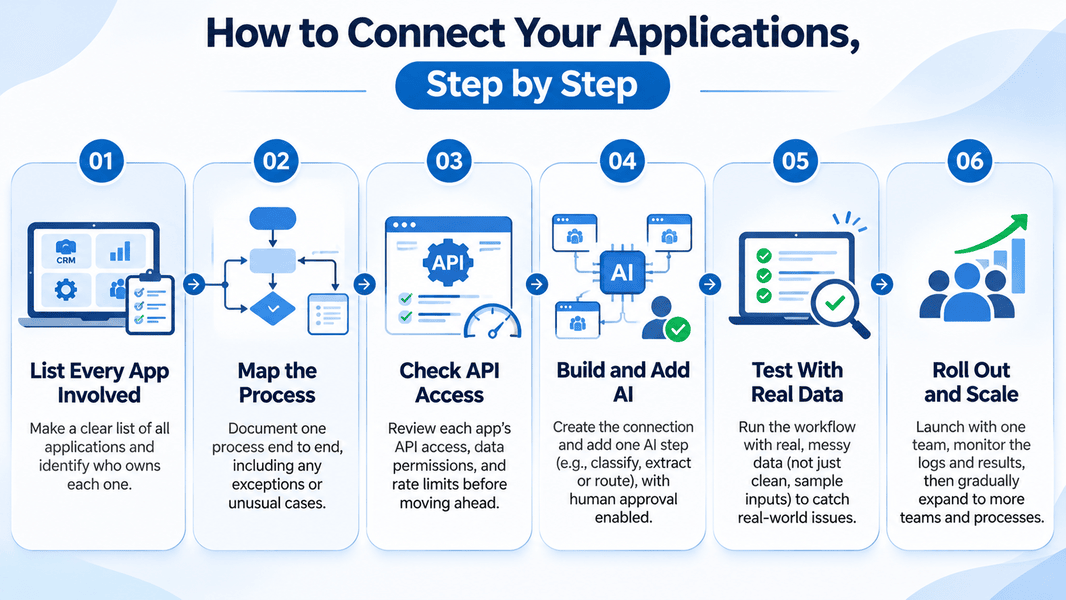
How to Connect Your Applications, Step by Step
Challenges You Should Expect
AI automation is also the wrong call for a process that runs ten times a month. A checklist is cheaper. For everything else, these are the problems that actually show up:
- Legacy apps with no API. Best Practice: use read access at database level or a thin wrapper. If neither exists, replace the app before building around it.
- Dirty data. Best Practice: deduplicate first. AI on bad data produces confident nonsense.
- AI mistakes. Best Practice: set confidence thresholds, and keep human review on money, legal and customer-facing output.
- Security and compliance. Best Practice: least-privilege API keys, logged access, and a data-residency check before anything goes to an external model.
- Staff resistance. Best Practice: involve the people who do the work today. They know the exceptions.
- Broken connections after vendor updates. Best Practice: alerts on failures and a named owner for every integration.
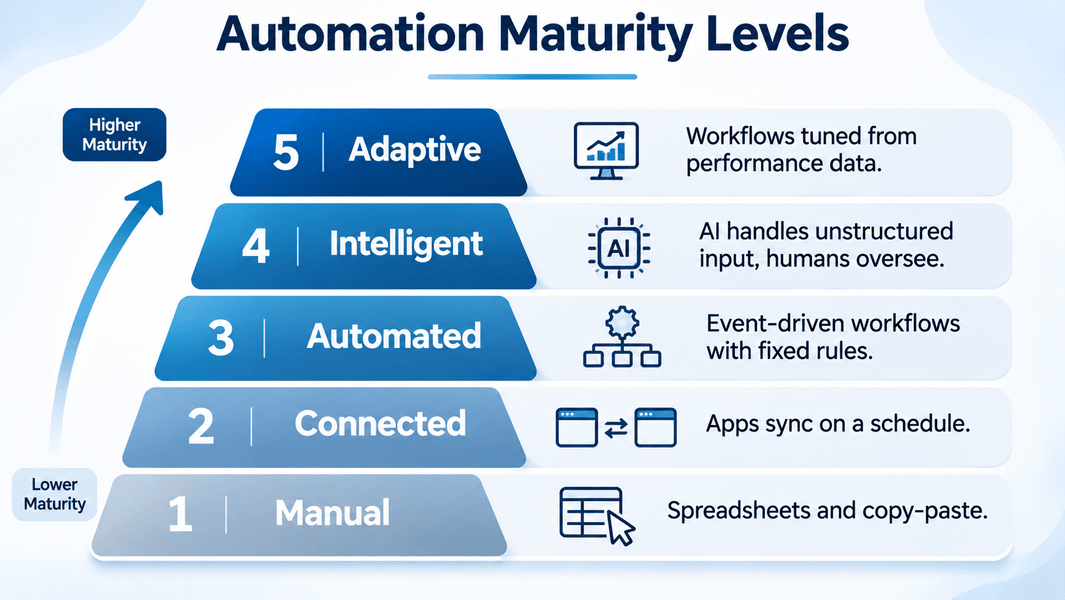
Automation Maturity Levels
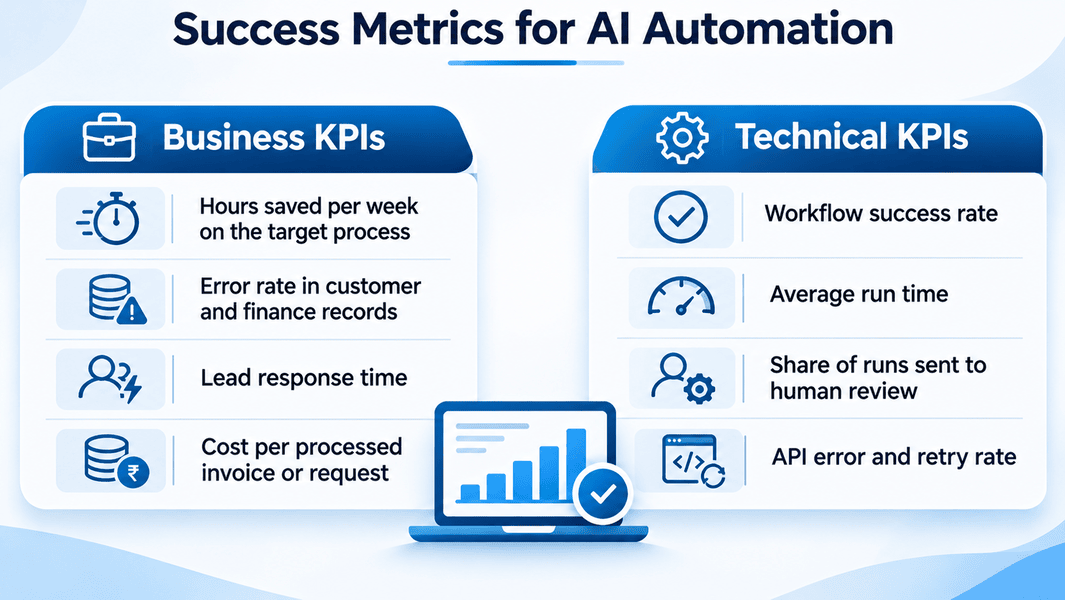
Success Metrics
Where This Is Heading
- AI agents completing multi-step tasks across apps, with approval gates
- Open standards such as the Model Context Protocol making app connections simpler
- Smaller models running inside company networks for sensitive data
- Regulation, including the EU AI Act, shaping how automated decisions are documented
Where to Start
Connecting your apps is rarely a technology problem. It’s a question of picking the right first process and keeping a person in the loop until the numbers earn trust. If you’re weighing AI automation services, send us the list of apps that should be talking and aren’t, and we’ll tell you which connection to build first.
FAQs
1. What is AI workflow automation?
It links your business apps so data moves between them automatically, with AI handling steps that need interpretation, such as reading documents or classifying requests.
2. How long does it take to connect business applications?
One workflow usually takes a few weeks. API access and data quality decide whether it’s closer to three or ten.
3. Do I need to replace my current software?
Usually not. Most modern tools expose APIs. Legacy systems without them are the exception.
4. Is it safe to send business data to AI models?
It can be, with least-privilege access, logging and a check on where the model processes data. Sensitive records may need a self-hosted option.
5. How do I know it’s working?
Track one business KPI, such as hours saved, and one technical KPI, such as workflow success rate, from week one.