


How AI Integration Can Improve Existing Business Apps
McKinsey’s State of AI survey, published in November 2025, found that 88 percent of organizations use AI in at least one business function, yet most are still stuck in pilots. I see the same pattern constantly. A team adds a chatbot, calls it transformation, and the finance app still needs six clicks to approve an invoice. The real gains usually sit inside software you already run. If you’re hunting for the best IT company to add AI to those systems without a rebuild, here’s what works, what doesn’t, and what to measure.
What Is AI Integration in Existing Business Apps?
It means connecting machine learning, language models, or automation to software your team already uses, through APIs or a service layer, instead of replacing it. It typically includes:
- Predictive models that read your existing data (forecasts, risk scores)
- Natural-language search and summaries inside CRMs, ERPs, and portals
- Document and email processing that feeds records automatically
- Recommendation or routing logic for support and sales workflows
- Monitoring that flags anomalies before users notice
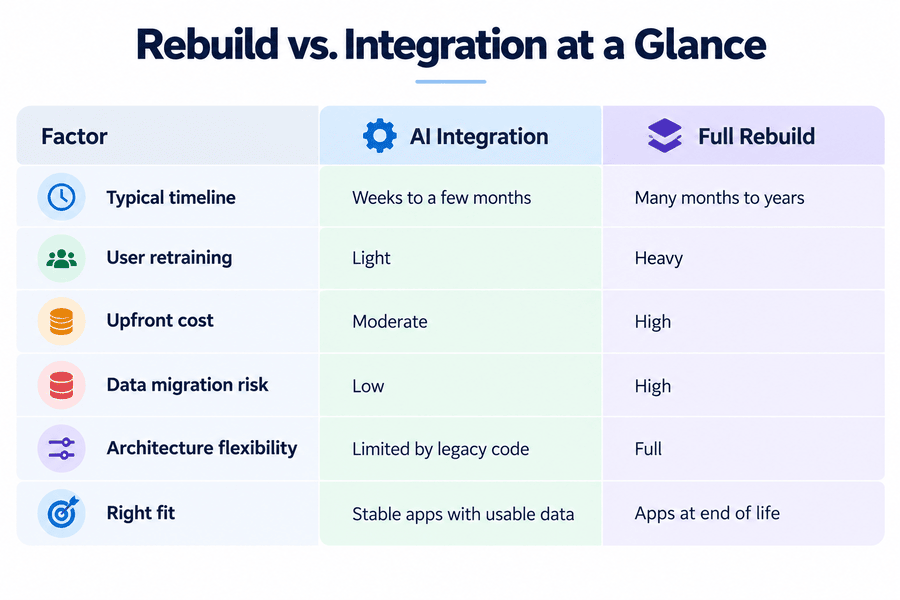
Why Businesses Choose Integration Over a Full Rebuild
- Less disruption, since staff keep the interface they know
- Faster payback than rewriting from scratch
- Existing data and integrations stay intact
- Gradual rollout, one workflow at a time
- Easier to reverse if a feature underperforms
Rebuild Vs. Integration
IT Services That Make AI Work Inside Existing Applications
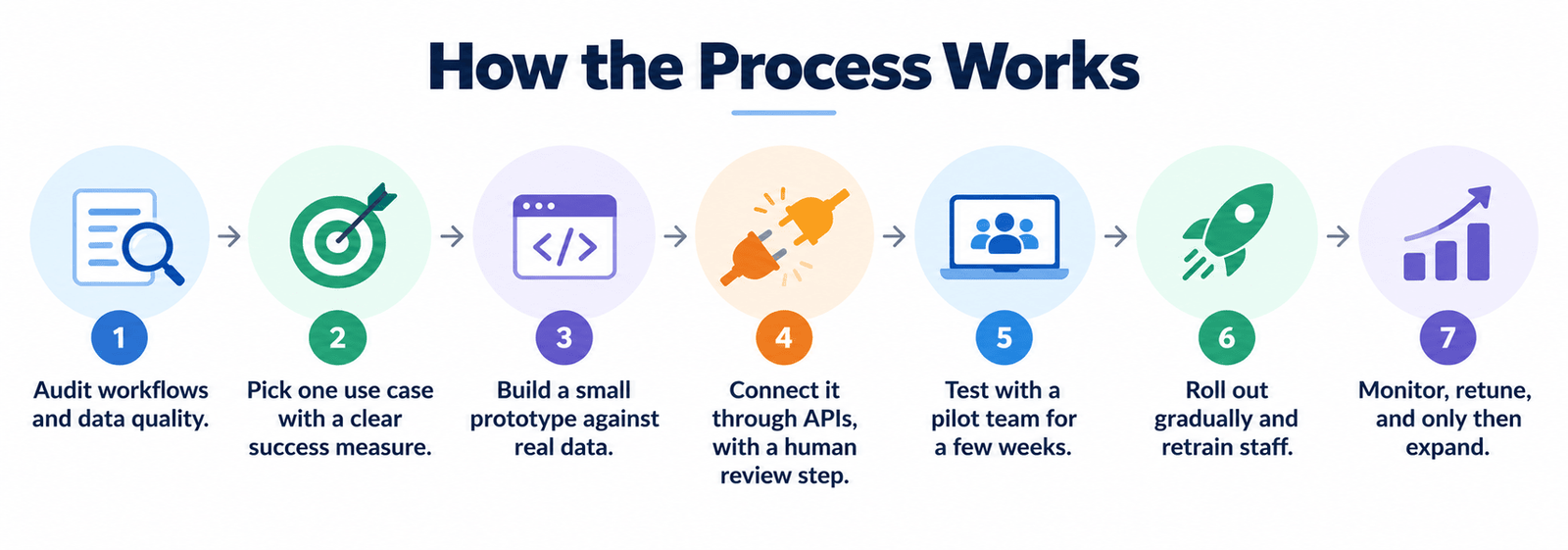
Good IT services start with an audit, not a model. Someone has to map where your app wastes time before anything ships. Common use cases:
- Pulling data out of invoices and forms automatically
- Ticket triage and routing
- Plain-English reporting (“show me Q3 returns by region”)
- Duplicate and error detection in records
- Draft replies for support agents, approved by a human
- Lead scoring inside the CRM
Discover AI Website in an Hour: AI Can Build Website in an Hour
Predictive Analytics on Data You Already Have
Most apps sit on years of history nobody queries. A forecasting layer can turn that into decisions.
- Demand and inventory forecasting
- Churn warnings from usage patterns
- Maintenance alerts from equipment logs
- Fraud and anomaly flags
- Cash-flow projections in finance tools
Mittal Technologies Insight: Our experienced team asks one question before anything else: which workflow has clean data and a named owner? Teams that start with the messiest process usually stall by month two.
What to Look for in the Best IT Company for AI Integration
Picking a partner matters more than picking a model. Look for one that:
- Has worked on legacy stacks like yours, not just clean demos
- Explains where your data goes and who can see it
- Names a measurable target before kickoff
- Offers monitoring after launch
- Gives straight answers about when AI won’t help
How the Process Works
Challenges and Best Practices
A trusted IT solutions provider will say this part plainly. In that same McKinsey survey, 51 percent of respondents reported at least one negative consequence from AI use, with inaccuracy the most common at 30 percent.
- Messy data. Best Practice: clean and label a sample first. Don’t train on junk.
- Confident wrong answers. Best Practice: require human approval for anything customer-facing or financial.
- Security and compliance exposure. Best Practice: keep sensitive data in your own environment, set access rules, and check regulations such as GDPR.
- Undocumented legacy code. Best Practice: wrap it in an API layer instead of editing core logic.
- Staff resistance. Best Practice: involve daily users from week one.
- AI isn’t always the answer. Best Practice: if a simple rule solves it, use the rule.
Read AI Chatbots vs. Human Support: AI Chatbots vs Traditional Customer Support
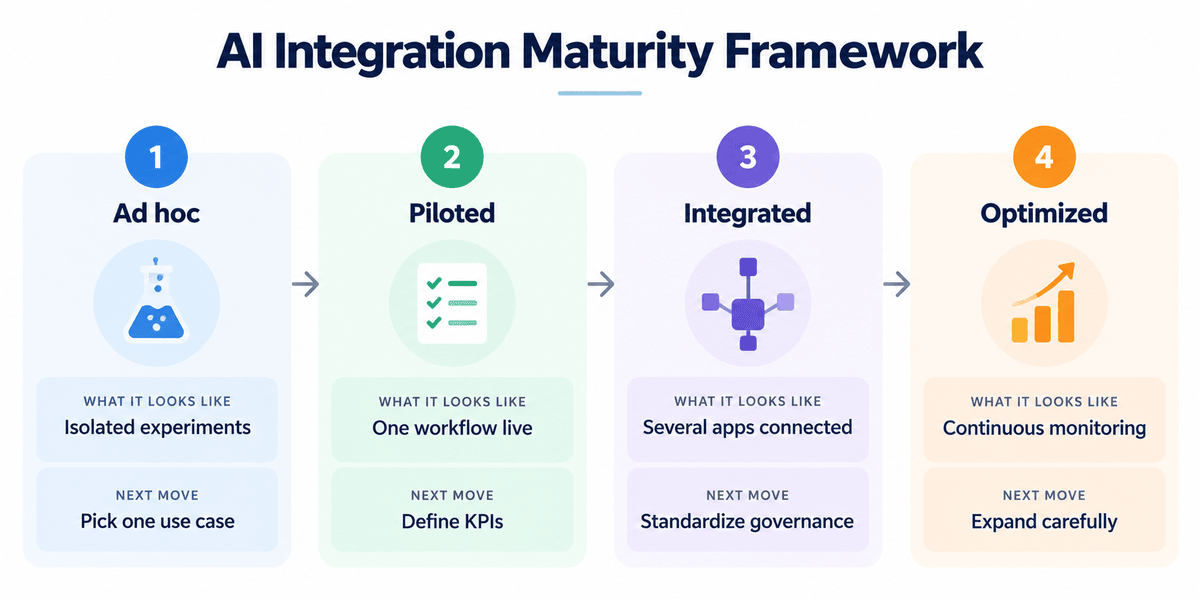
AI Integration Maturity Framework
Success Metrics
Business KPIs:
- Hours saved per week on the target workflow
- Cost per transaction or ticket
- Error and rework rate
- Customer response time
Technical KPIs:
- Accuracy against a human baseline
- Latency per request
- Uptime and fallback rate
- Cost per AI call
Future Trends
- AI agents handling multi-step tasks inside business apps; McKinsey found 62 percent of respondents already experimenting with them
- Smaller models running on private infrastructure
- Natural-language interfaces replacing deep menus
- Regulation such as the EU AI Act shaping how features are documented
- Audit trails and governance becoming standard requirements
Explore How AI Is Reshaping Businesses: How AI Is Transforming Small Businesses in 2026
Where This Leaves You
AI inside your current applications can cut manual work and sharpen decisions without the cost of starting over, as long as you pick one workflow and measure it honestly. If you want a second opinion on where to begin, talk to us and bring the one process that frustrates your team most.
FAQs
1. How long does AI integration take for an existing application?
A focused pilot can take a few weeks to a couple of months. Data quality and the age of the system drive most of the variation.
2. Do we need to replace our legacy software?
Usually not. AI features connect through APIs or a service layer. A rebuild only makes sense if the core system can’t expose its data.
3. Is our data safe?
It depends on the setup. Use private deployments or vendor terms that bar training on your data, and restrict access by role.
4. How do I know if a workflow is worth automating with AI?
Look for repetitive, high-volume tasks with decent data. Measure time and error rates today, then compare after the pilot.
5. What should I ask an IT services provider before signing?
Ask for similar legacy projects, who owns the data and models, how success gets measured, and what support looks like after launch.