


UI/UX Design vs Web Design: What's Actually the Difference
I get some version of this question almost every month: "We need a site redesign — do we need a UI UX design agency, or just a web design company?" Most people assume it's the same thing wearing two name tags. It isn't.
According to Forrester’s research on the ROI of design thinking, three out of four design-thinking projects can return at least twice their investment, with a median ROI of 229%. This doesn’t mean every project will get the same results, but it shows that investing in a better user experience can have real business value.
So, before you choose a web design company or a UI/UX design agency, it helps to understand what each one does. A website can look great, but if visitors struggle to use it, the design isn’t doing its full job.
What Is the Difference Between UI/UX Design and Web Design?
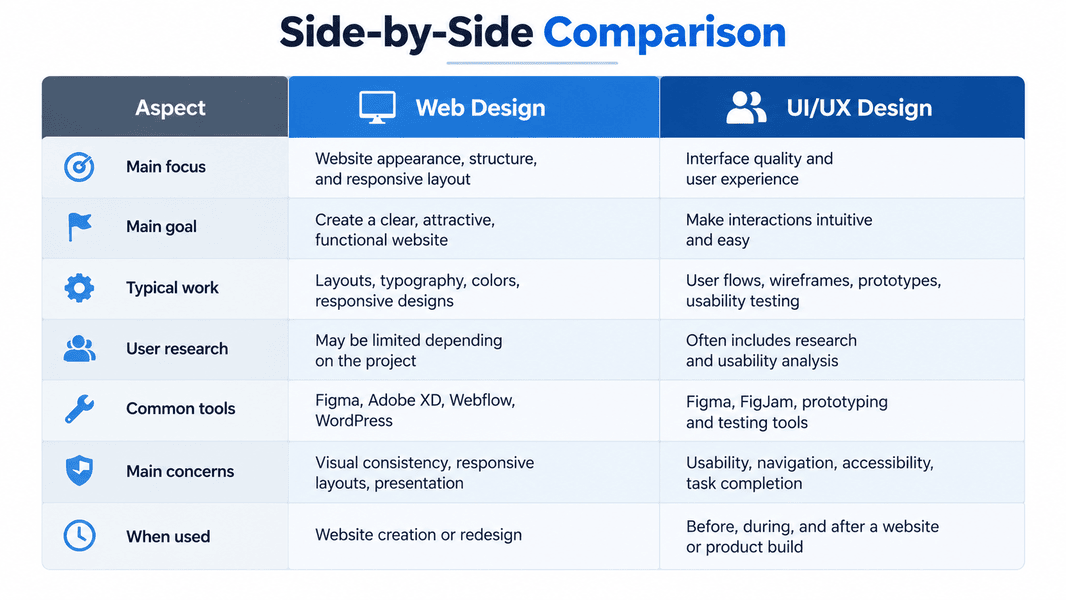
Web design is about building and structuring a website — layout, visual style, responsiveness, the code holding it together. UI and UX design sit a layer deeper: UI covers how a product looks and feels to interact with, and UX covers whether the entire journey, from landing on a page to completing a purchase, actually makes sense to a real person.
- Web design: page layout, visual branding, responsive coding, CMS setup
- UI design: buttons, typography, color systems, component consistency
- UX design: user research, wireframes, information architecture, usability testing
Why UI/UX and Web Design Often Work Together
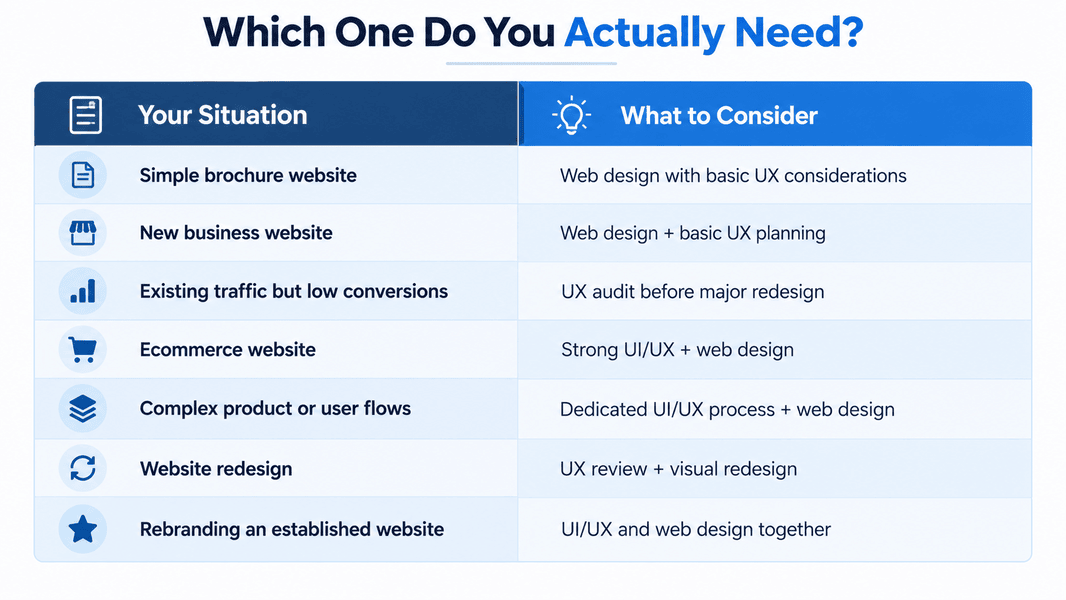
A website project doesn't always need separate UI/UX and web design teams. Many agencies handle both. However, giving UI/UX more attention can be useful when a website has complex user journeys, ecommerce flows, account areas, forms, or other interactions where usability matters.
- Fewer usability issues because important user flows are considered before development
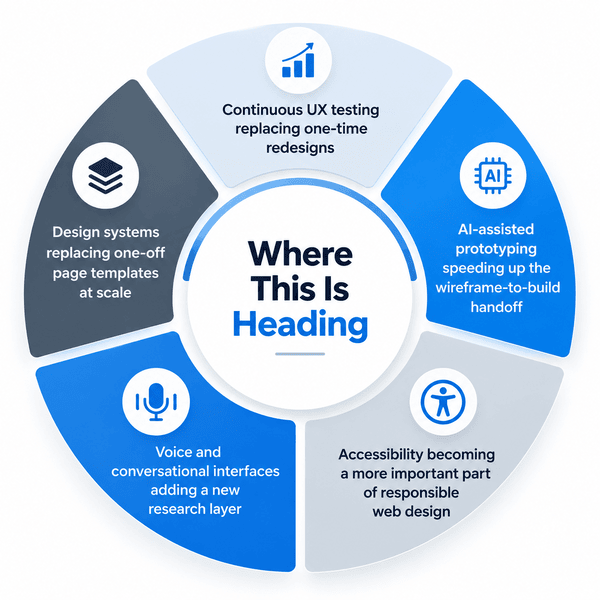
- Design systems that create consistency across pages and components
- Easier to update branding without redesigning every page from scratch
- More attention to accessibility and inclusive design
- Better experiences across desktop, tablet, and mobile devices
When Does Your Website Need UI/UX Design?
A well-built site can still lose customers if the experience underneath is confusing.
- Multi-step forms with high abandonment
- Visitors struggling to find pricing or important information
- Unclear navigation
- Mobile experiences that feel difficult to use
- Too many competing calls to action
- A complex checkout or onboarding process
Mittal Technologies Insight: Clients who come to us after a "pretty but underperforming" redesign almost always skip the research phase. Visuals got approved by committee, not tested by users, and that gap shows up in analytics within weeks.
Where Web Design Still Carries the Weight
None of the UX work matters if the underlying site is slow or broken on mobile. That's still web design's job — clean crawlable code, responsive breakpoints that hold up on real devices, a CMS structure your team can actually update, and page speed that doesn't undo good design decisions.
Getting Both Right: A Practical Process
- Start with user research — interviews, competitor audits, existing analytics
- Map core user journeys before touching visuals
- Build low-fidelity wireframes, test with 5-8 real users
- Move into UI design — typography, color, component library
- Hand off a working prototype to development, not just static screens
- Build the responsive site with performance budgets set upfront
- Run post-launch usability testing and iterate on real behavior
Our Erneroy content publishing platform case study walks through a project where UX research directly reshaped the final build, if you want to see this end to end.
Common Challenges and How to Fix Them
- Challenge: Stakeholders approve designs on personal preference, not data. Fix: Require one round of user testing before final sign-off, even a lightweight one.
- Challenge: UX prototypes get built without checking technical feasibility. Fix: Loop in developers at the wireframe stage, not after approval.
- Challenge: Mobile is treated as an afterthought. Fix: Design mobile-first, then scale up to desktop.
- Challenge: Redesigns chase aesthetics and skip conversion metrics. Fix: Set a baseline KPI before the project starts, measure against it after.
- Challenge: Accessibility gets bolted on at the end, if at all. Fix: Build accessibility into the design system from day one — cheaper than retrofitting.
A Word of Caution
Neither discipline is a silver bullet. Good UX research needs real user access — rushing it produces the same guesswork it's meant to replace. And a beautifully coded site with zero UX input still frustrates the people using it. Budget and timeline constraints often force teams to pick one over the other; that trade-off should be a conscious call, not a default.
Wrapping Up
Treating UI/UX design and web design as one line item is how good-looking websites quietly underperform. Separate them, or at least make sure both get proper attention, and you end up with a site that works as well as it looks. If you're weighing this for an upcoming project, we're happy to talk through what your specific situation needs — reach out here whenever it's useful.
FAQs
1. Is UI/UX design part of web design, or separate from it?
They overlap, but they aren't the same. Web design focuses on the website's visual structure, layout, and presentation, while UI/UX design focuses more specifically on the interface and how users interact with it. In many projects, the two are handled together.
2. Do I need a UI UX design company for a small business site?
Not always. A simple, low-interaction site can often get by on solid web design alone. Add forms, checkouts, or multi-step flows, and UX input starts paying off.
3. How do I evaluate a UI UX design agency before hiring one?
Ask for case studies showing measurable outcomes — conversion lifts, reduced drop-off, not just a portfolio of screenshots.
4. What makes a website have good UI/UX?
Good UI/UX usually combines clear navigation, readable content, consistent interface elements, accessible design, responsive layouts, and simple user flows. The right choices also depend on the website's audience and goals.
5. Can I redesign the UX without touching the existing web design?
Sometimes, for flow and copy changes. Bigger UX shifts often require structural template changes, so full independence isn't always realistic.